Netty
互联网服务端处理网络请求的过程
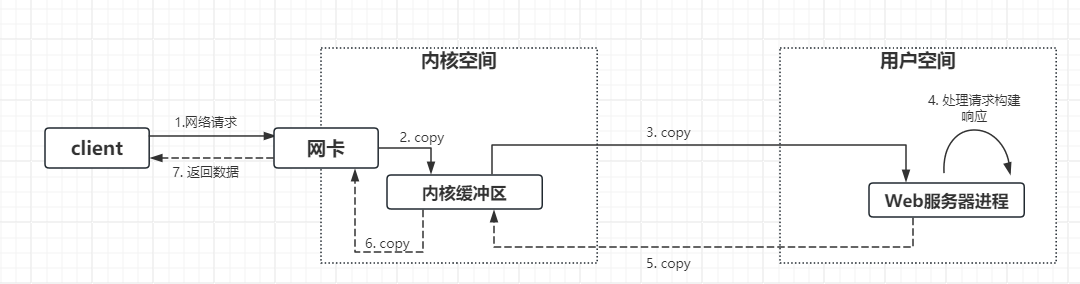
- 获取请求,客户端与服务端建立连接发出请求,服务器接收请求(1-3)
- 构建响应,当服务器收完请求,并在用户空间处理客户端的请求,直到构建响应完成(4)
- 返回数据,服务器将已构建好的响应通过内核空间的网络I/O发送给客户端(5-7)
NIO基础:non-blocking io(非阻塞IO)
TIP
NIO(New I/O或者Bon-blocking I/O) 是从Java1.4开始引入的一种新的I/O编程方式,相对于传统的IO来说,NIO更加灵活、高效、可靠,能够更好地处理海量数和高并发场景。简单来说就是:并发能力强。
三大组件
- Channel:通道,用于数据的读写
TIP
Channel是数据传输的双向通道,Stream要不就是读,要不就是写。Channel比Stream更加底层。 常见的Channel有
- FileChannel:文件通道,用于文件读写
- SocketChannel:套接字通道,用于网络通信
- DatagramChannel:数据报通道,用于网络通信
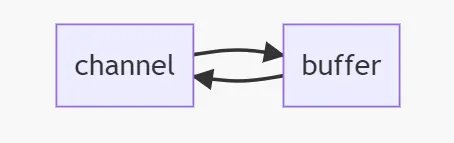
- Buffer:缓冲区,用于数据的存取
TIP
Buffer是用来缓冲读写数据的 常见的Buffer有
- ByteBuffer
- CharBuffer
- DoubleBuffer
- FloatBuffer
- IntBuffer
- LongBuffer
- ShortBuffer
- Selector:选择器,用于监听Channel的IO事件
TIP
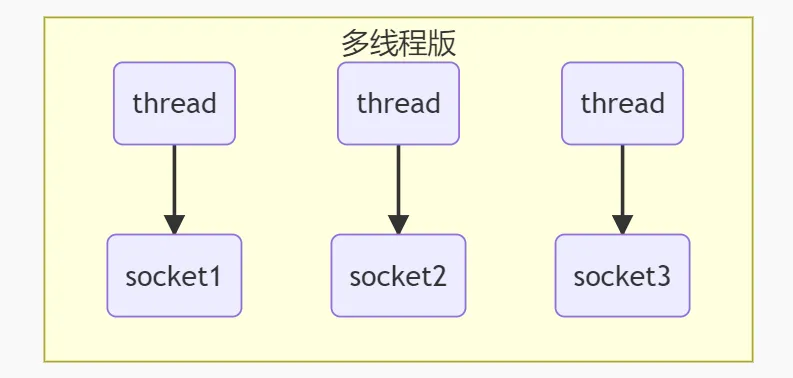
以前的多线程服务器程序,一个线程对应一个Socket,只能合适连接数少的场景。而线程池版本,阻塞模式下,只能处理一个Socket连接。 selector的作用就是配合一个线程来管理多个channel,适合连接数特别多,但流量低的场景。.
| 线程池版本 | 多线程版本 |
|---|---|
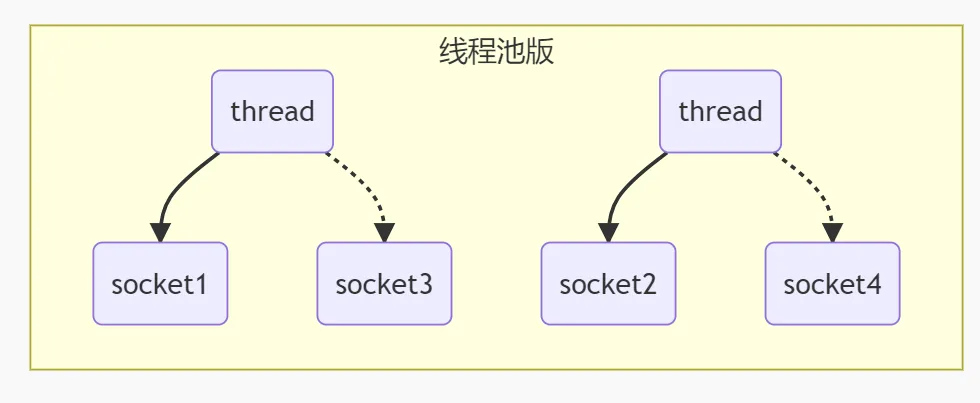 |  |
 调用selector的select()会阻塞到channel发生了读写就绪事件,这些事件发生,select()方法就会放回这些事件交给thread来处理。
 ByteBuffer
ByteBuffer的使用方式
- 向
buffer写入数据,调用channel.read(buffer),返回值为实际读取的字节数,若为-1,则表示通道已经关闭 - 调用
flip()切换至 读模式 - 从
buffer中读取数据,调用channel.write(buffer) - 调用
clear()或compact()切换至 写模式 - 重复步骤1~4
public static void main(String[] args) {
    // 获取文件channel
    // 1.从文件流获取  2. new RandomAccessFile().getChannel()
    try (FileChannel channel = new FileInputStream("pom.xml").getChannel()) {
        // 分配一个缓冲区
        ByteBuffer allocate = ByteBuffer.allocate(1024);
        // 读取文件
        while (channel.read(allocate) != -1) {
            // 切换为读模式
            allocate.flip();
            // 读取数据
            while (allocate.hasRemaining()) {
                logger.info(String.valueOf((char) allocate.get()));
            }
            // 切换为写模式
            allocate.clear();
        }
    } catch (IOException e) {
        e.printStackTrace();
    }
}
ByteBuffer 结构
重要属性
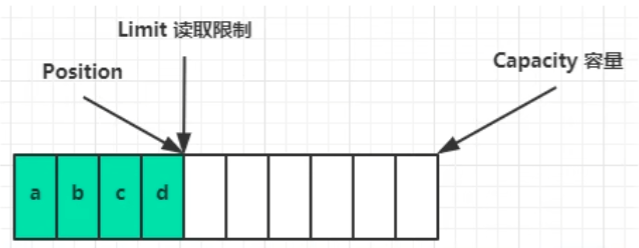
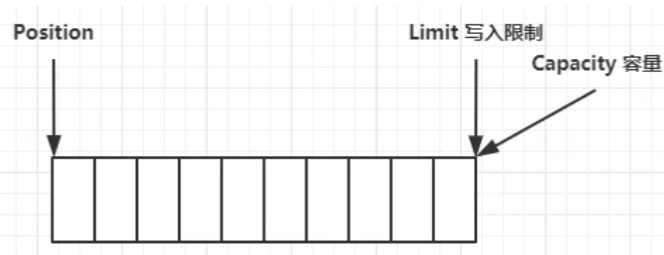
capacity,表示缓冲区可以存储的最大字节数,不能改变limit,表示缓冲区可以读取的最大字节数,不能改变position,表示缓冲区可以写入的最大字节数,不能改变
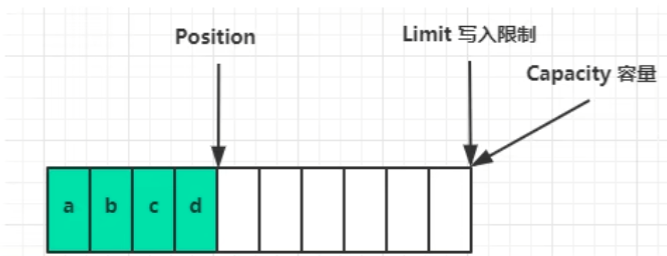
流程: 初始状态 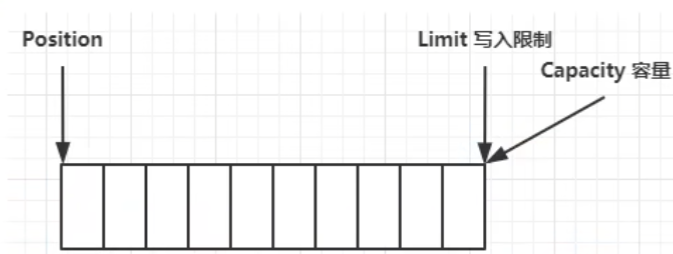 写模式下,position是写入位置,limit等于容量,写入四个字节后的状态
  flip动作发生后,position切换为读取位置,limit切换为读取限制
 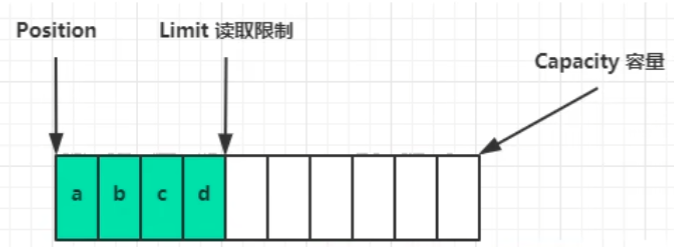 读取四个字节后的状态
  clear动作发生后
  compact方法,是把未读完的部分向前压缩,然后切换至写模式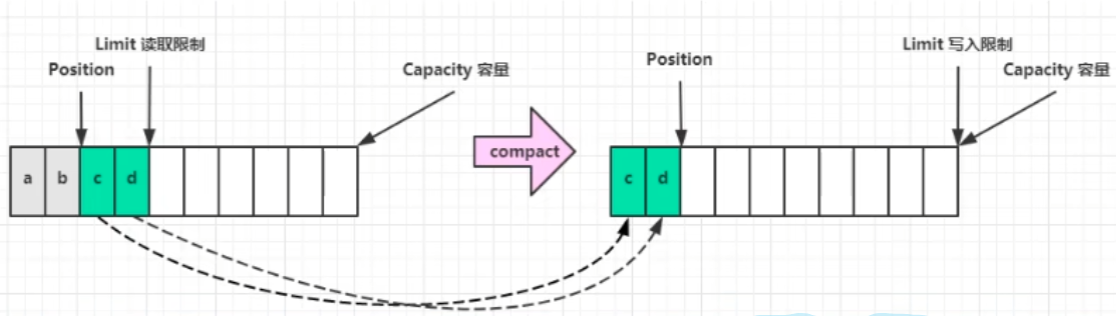
调试查看内部结构
- 调试工具类
import io.netty.util.internal.StringUtil;

import java.nio.ByteBuffer;

import static io.netty.util.internal.MathUtil.isOutOfBounds;
import static io.netty.util.internal.StringUtil.NEWLINE;

public class ByteBufferUtil {
    private static final char[] BYTE2CHAR = new char[256];
    private static final char[] HEXDUMP_TABLE = new char[256 * 4];
    private static final String[] HEXPADDING = new String[16];
    private static final String[] HEXDUMP_ROWPREFIXES = new String[65536 >>> 4];
    private static final String[] BYTE2HEX = new String[256];
    private static final String[] BYTEPADDING = new String[16];

    static {
        final char[] DIGITS = "0123456789abcdef".toCharArray();
        for (int i = 0; i < 256; i++) {
            HEXDUMP_TABLE[i << 1] = DIGITS[i >>> 4 & 0x0F];
            HEXDUMP_TABLE[(i << 1) + 1] = DIGITS[i & 0x0F];
        }

        int i;

        // Generate the lookup table for hex dump paddings
        for (i = 0; i < HEXPADDING.length; i++) {
            int padding = HEXPADDING.length - i;
            StringBuilder buf = new StringBuilder(padding * 3);
            for (int j = 0; j < padding; j++) {
                buf.append("   ");
            }
            HEXPADDING[i] = buf.toString();
        }

        // Generate the lookup table for the start-offset header in each row (up to 64KiB).
        for (i = 0; i < HEXDUMP_ROWPREFIXES.length; i++) {
            StringBuilder buf = new StringBuilder(12);
            buf.append(NEWLINE);
            buf.append(Long.toHexString(i << 4 & 0xFFFFFFFFL | 0x100000000L));
            buf.setCharAt(buf.length() - 9, '|');
            buf.append('|');
            HEXDUMP_ROWPREFIXES[i] = buf.toString();
        }

        // Generate the lookup table for byte-to-hex-dump conversion
        for (i = 0; i < BYTE2HEX.length; i++) {
            BYTE2HEX[i] = ' ' + StringUtil.byteToHexStringPadded(i);
        }

        // Generate the lookup table for byte dump paddings
        for (i = 0; i < BYTEPADDING.length; i++) {
            int padding = BYTEPADDING.length - i;
            StringBuilder buf = new StringBuilder(padding);
            for (int j = 0; j < padding; j++) {
                buf.append(' ');
            }
            BYTEPADDING[i] = buf.toString();
        }

        // Generate the lookup table for byte-to-char conversion
        for (i = 0; i < BYTE2CHAR.length; i++) {
            if (i <= 0x1f || i >= 0x7f) {
                BYTE2CHAR[i] = '.';
            } else {
                BYTE2CHAR[i] = (char) i;
            }
        }
    }

    /**
     * 打印所有内容
     * @param buffer
     */
    public static void debugAll(ByteBuffer buffer) {
        int oldlimit = buffer.limit();
        buffer.limit(buffer.capacity());
        StringBuilder origin = new StringBuilder(256);
        appendPrettyHexDump(origin, buffer, 0, buffer.capacity());
        System.out.println("+--------+-------------------- all ------------------------+----------------+");
        System.out.printf("position: [%d], limit: [%d]\n", buffer.position(), oldlimit);
        System.out.println(origin);
        buffer.limit(oldlimit);
    }

    /**
     * 打印可读取内容
     * @param buffer
     */
    public static void debugRead(ByteBuffer buffer) {
        StringBuilder builder = new StringBuilder(256);
        appendPrettyHexDump(builder, buffer, buffer.position(), buffer.limit() - buffer.position());
        System.out.println("+--------+-------------------- read -----------------------+----------------+");
        System.out.printf("position: [%d], limit: [%d]\n", buffer.position(), buffer.limit());
        System.out.println(builder);
    }

    public static void appendPrettyHexDump(StringBuilder dump, ByteBuffer buf, int offset, int length) {
        if (isOutOfBounds(offset, length, buf.capacity())) {
            throw new IndexOutOfBoundsException(
                    "expected: " + "0 <= offset(" + offset + ") <= offset + length(" + length
                            + ") <= " + "buf.capacity(" + buf.capacity() + ')');
        }
        if (length == 0) {
            return;
        }
        dump.append(
                "         +-------------------------------------------------+" +
                        NEWLINE + "         |  0  1  2  3  4  5  6  7  8  9  a  b  c  d  e  f |" +
                        NEWLINE + "+--------+-------------------------------------------------+----------------+");

        final int startIndex = offset;
        final int fullRows = length >>> 4;
        final int remainder = length & 0xF;

        // Dump the rows which have 16 bytes.
        for (int row = 0; row < fullRows; row++) {
            int rowStartIndex = (row << 4) + startIndex;

            // Per-row prefix.
            appendHexDumpRowPrefix(dump, row, rowStartIndex);

            // Hex dump
            int rowEndIndex = rowStartIndex + 16;
            for (int j = rowStartIndex; j < rowEndIndex; j++) {
                dump.append(BYTE2HEX[getUnsignedByte(buf, j)]);
            }
            dump.append(" |");

            // ASCII dump
            for (int j = rowStartIndex; j < rowEndIndex; j++) {
                dump.append(BYTE2CHAR[getUnsignedByte(buf, j)]);
            }
            dump.append('|');
        }

        // Dump the last row which has less than 16 bytes.
        if (remainder != 0) {
            int rowStartIndex = (fullRows << 4) + startIndex;
            appendHexDumpRowPrefix(dump, fullRows, rowStartIndex);

            // Hex dump
            int rowEndIndex = rowStartIndex + remainder;
            for (int j = rowStartIndex; j < rowEndIndex; j++) {
                dump.append(BYTE2HEX[getUnsignedByte(buf, j)]);
            }
            dump.append(HEXPADDING[remainder]);
            dump.append(" |");

            // Ascii dump
            for (int j = rowStartIndex; j < rowEndIndex; j++) {
                dump.append(BYTE2CHAR[getUnsignedByte(buf, j)]);
            }
            dump.append(BYTEPADDING[remainder]);
            dump.append('|');
        }

        dump.append(NEWLINE +
                "+--------+-------------------------------------------------+----------------+");
    }

    public static void appendHexDumpRowPrefix(StringBuilder dump, int row, int rowStartIndex) {
        if (row < HEXDUMP_ROWPREFIXES.length) {
            dump.append(HEXDUMP_ROWPREFIXES[row]);
        } else {
            dump.append(NEWLINE);
            dump.append(Long.toHexString(rowStartIndex & 0xFFFFFFFFL | 0x100000000L));
            dump.setCharAt(dump.length() - 9, '|');
            dump.append('|');
        }
    }

    public static short getUnsignedByte(ByteBuffer buffer, int index) {
        return (short) (buffer.get(index) & 0xFF);
    }
}
ByteBuffer 的方法
分配空间
allocate(int capacity):分配一个指定大小的缓冲区,java堆内存,读写效率低,受到GC影响allocateDirect(int capacity):分配一个指定大小的直接缓冲区,直接内存,读写效率高,不受GC影响,分配效率低
写入数据
- 调用channel的read方法:
channel.read(buffer) - 调用buffer的put方法:
buffer.put(byte)
- 调用channel的read方法:
读取数据
- 调用channel的write方法:
channel.write(buffer) - 调用buffer的get方法:
buffer.get()- get方法会让position读指针向后移动,如果想重复读取数据
- 可以调用
rewind()方法,将position重置为0 - 调用
get(int i)方法获取索引i的数据,不会改变position
- 可以调用
- get方法会让position读指针向后移动,如果想重复读取数据
- 调用channel的write方法:
记录mark & reset
mark():记录position的位置,用于后续的reset操作reset():将position重置为mark的位置
ByteBuffer 和 字符串的转换
public static void main(String[] args) {
    String str = "hello world";
    byte[] bytes = str.getBytes();
    ByteBuffer buffer = ByteBuffer.allocate(bytes.length);
    buffer.put(bytes);

    ByteBuffer helloWorld = StandardCharsets.UTF_8.encode("hello world");


    ByteBuffer wrap = ByteBuffer.wrap(bytes);

    // 转为字符串
    String decode = StandardCharsets.UTF_8.decode(wrap).toString();
    System.out.println(decode);

    buffer.flip();
    String decode1 = StandardCharsets.UTF_8.decode(buffer).toString();
    System.out.println(decode1);
}
分散读集中写
- 分散读:将一个缓冲区按照一定规则分割成多个缓冲区,然后从channel中读取到各个缓冲区中
public static void main(String[] args) {
    ByteBuffer b1 = ByteBuffer.allocate(3);
    ByteBuffer b2 = ByteBuffer.allocate(3);
    ByteBuffer b3 = ByteBuffer.allocate(5);
    try (FileChannel channel = new RandomAccessFile("words.txt", "r").getChannel()) {
        channel.read(new ByteBuffer[] { b1, b2, b3});
        b1.flip();
        b2.flip();
        b3.flip();
        while (b1.hasRemaining()) {
            System.out.print((char) b1.get());
        }
        while (b2.hasRemaining()) {
            System.out.print((char) b2.get());
        }
        while (b3.hasRemaining()) {
            System.out.print((char) b3.get());
        }
    } catch (IOException e) {
    }
}
- 集中写:将多个缓冲区按照一定规则合并成一个缓冲区,然后写入到channel中
public static void main(String[] args) {
    ByteBuffer b1 = StandardCharsets.UTF_8.encode("hello ");
    ByteBuffer b2 = StandardCharsets.UTF_8.encode("world ");
    ByteBuffer b3 = StandardCharsets.UTF_8.encode("你好");
    try (FileChannel channel = new RandomAccessFile("words1.txt", "rw").getChannel()) {
        channel.write(new ByteBuffer[] { b1, b2, b3 });
    } catch (IOException e) {

    }
}
粘包、半包
- 粘包:指的是发送方发送的多个数据包在接收方被合并为一个数据包接收,或者一个完整的消息被分割成多个数据包接收 发送粘包:发送方连续发送多个小的数据包,接收方接收到的是这些数据包合并后的结果。 接收拆包:发送方发送的一个大数据包,接收方将其拆分成多个小数据包接收。
public static void main(String[] args) {
    ByteBuffer source = ByteBuffer.allocate(32);
    source.put("Hello,World\nI'm zhangsan\nHo".getBytes());
    split(source);
    source.put("w are you?\n".getBytes());
    split(source);
}

private static void split(ByteBuffer source) {
    source.flip();
    for (int i = 0; i < source.limit(); i++) {
        if (source.get(i) == '\n') {
            int length = i + 1 - source.position();
            ByteBuffer target = ByteBuffer.allocate(length);
            for (int j = 0; j < length; j++) {
                target.put(source.get());
            }
            target.flip();
            System.out.println(StandardCharsets.UTF_8.decode(target).toString());
        }
    }
    source.compact();
}
文件编程
FileChannel
TIP
FileChannel只能工作在阻塞模式下。 不能直接打开FileChannel,必须通过FileInputStream、FileOutputStream、RandomAccessFile等IO流来获取FileChannel,都有getChannel方法。
- 通过 FileInputStream 获取的 channel 只能读
- 通过 FileOutputStream 获取的 channel 只能写
- 通过 RandomAccessFile 是否能读写根据构造 RandomAccessFile 时的读写模式决定
- 读取
// 会从channel读取数据填充ByteBuffer,返回值表示读到了多少字节,-1 表示文件读取完毕
int readBytes = channel.read(buffer);
- 写入
// 写入的正确方式如下
ByteBuffer buffer = ByteBuffer.allocate(1024);
buffer.put(".."); // 写入数据
buffer.flip();  // 切换读模式
// 在 while 中调用 channel.write 是因为 write 方法并不能保证一次将 buffer 中的内容全部写入 channel
while (buffer.hasRemaining()) {
  channel.write(buffer);
}
关闭:channel 必须关闭,不过调用了 FileInputStream、FileOutputStream 或者 RandomAccessFile 的 close 方法会间接地调用 channel 的 close 方法
大小:使用 size 方法获取文件的大小
强制写入:操作系统出于性能的考虑,会将数据缓存,不是立刻写入磁盘。可以调用 force(true) 方法将文件内容和元数据(文件的权限等信息)立刻写入磁盘
两个Channel传输数据
- 小文件
String FROM = "helloword/data.txt";
String TO = "helloword/to.txt";
long start = System.nanoTime();
try (FileChannel from = new FileInputStream(FROM).getChannel();
     FileChannel to = new FileOutputStream(TO).getChannel();
) {
    from.transferTo(0, from.size(), to);
} catch (IOException e) {
    e.printStackTrace();
}
long end = System.nanoTime();
System.out.println("transferTo 用时:" + (end - start) / 1000_000.0);
- 超大文件
public static void main(String[] args) {
    try (
            FileChannel from = new FileInputStream("data.txt").getChannel();
            FileChannel to = new FileOutputStream("to.txt").getChannel();
    ) {
        // 效率高,底层会利用操作系统的零拷贝进行优化
        long size = from.size();
        // left 变量代表还剩余多少字节
        for (long left = size; left > 0; ) {
            System.out.println("position:" + (size - left) + " left:" + left);
            left -= from.transferTo((size - left), left, to);
        }
    } catch (IOException e) {
        e.printStackTrace();
    }
}
Path
- 遍历文件夹
// 要遍历的文件夹
Path path = Paths.get("D:\\Java\\netty");
// 文件夹个数
AtomicInteger dirCount = new AtomicInteger();
// 文件个数
AtomicInteger fileCount = new AtomicInteger();
// 开始遍历
Files.walkFileTree(path, new SimpleFileVisitor<Path>(){
		// 进入文件夹之前的操作
    @Override
    public FileVisitResult preVisitDirectory(Path dir, BasicFileAttributes attrs) throws IOException {
        System.out.println("====> " + dir);
        dirCount.incrementAndGet();
        return super.preVisitDirectory(dir, attrs);
    }
		// 遍历到文件的操作
    @Override
    public FileVisitResult visitFile(Path file, BasicFileAttributes attrs) throws IOException {
        System.out.println(file);
        fileCount.incrementAndGet();
        return super.visitFile(file, attrs);
    }
});
System.out.println(dirCount);
System.out.println(fileCount);
Files
- 检查文件是否存在
Path path = Paths.get("helloword/data.txt");
System.out.println(Files.exists(path));
- 创建单级目录
Path path = Paths.get("helloword/d1");
Files.createDirectory(path);
- 拷贝文件
Path source = Paths.get("helloword/data.txt");
Path target = Paths.get("helloword/target.txt");

Files.copy(source, target);
网络编程
非阻塞 VS 阻塞
阻塞
- 阻塞模式下,相关方法都会导致线程暂停
- ServerSocketChannel.accept()会在没有连接建立时让线程暂停
- SocketChannel.read()会在没有数据可读时让线程暂停
- 阻塞的表现其实就是线程暂停,暂停期间不会暂用CPU,相当于闲置
- 单线程下,则色方法之间相互影响,几乎不能正常工作,需要多线程支持
- 多线程下
- 32位JVM一个线程320k,64位JVM一个线程1024k,如果连接数过多,必然导致OOM,并且线程太多,反而会因为频繁切换上下文导致性能降低
- 可以采用线程池技术来减少线程数和线程上下文切换,但是治标不治本。
阻塞简单例子:问题,当连接A建立后,1s后,A发送数据服务器收不到数据,元婴时服务器还在等待另外一个客户端的连接
服务端
// 0. 创建buffer
ByteBuffer buffer = ByteBuffer.allocate(16);
// 1. 创建服务器
ServerSocketChannel ssc = ServerSocketChannel.open();
// 2. 绑定端口
ssc.bind(new InetSocketAddress(8080));

// 3. 连接集合
ArrayList<SocketChannel> channels = new ArrayList<>();

while(true) {
    log.debug("connecting...");
    SocketChannel sc = ssc.accept();
    log.debug("connect... {}", sc);
    channels.add(sc);
    for(SocketChannel channel: channels) {
        // 5. 接收客户端发送的数据
        log.debug("before read... {}", channel);
        channel.read(buffer); // 阻塞方法,线程停止运行
        buffer.flip();
        debugRead(buffer);
        buffer.clear();
        log.debug("after read...{}", channel);
    }
}
客户端
SocketChannel sc = SocketChannel.open();
sc.connect(new InetSocketAddress("localhost", 8080));
sc.write(Charset.defaultCharset().encode("1237\n"));
sc.write(Charset.defaultCharset().encode("1234567890abc\n"));
System.out.println("waiting...");
System.in.read();
非阻塞
- 非阻塞模式下,相关方法不会导致线程暂停
- accept()方法返回空,继续运行
- read()方法返回0,继续运行
- 写数据就直接写入,不需要等待网络发送数据。
- 但非阻塞模式下,即使没有建立连接、没有可读数据,线程任然在不断运行,导致CPU空转
- 数据复制过程中,线程实际还是阻塞的(AIO改进的地方) 非阻塞简单例子:
服务器端:主要多了ssc.configureBlocking(false);
// 0. 创建buffer
ByteBuffer buffer = ByteBuffer.allocate(16);

// 1. 创建服务器
ServerSocketChannel ssc = ServerSocketChannel.open();
// 非阻塞模式
ssc.configureBlocking(false);
// 2. 绑定端口
ssc.bind(new InetSocketAddress(8080));

// 3. 连接集合
ArrayList<SocketChannel> channels = new ArrayList<>();
while(true) {
    log.debug("connecting...");
		// 4. 进行连接
    SocketChannel sc = ssc.accept();
    if(sc != null) {
        sc.configureBlocking(false);
        channels.add(sc);
    }
    log.debug("connect... {}", sc);
    for(SocketChannel channel: channels) {
        // 5. 接收客户端发送的数据
        log.debug("before read... {}", channel);
        int len = channel.read(buffer); // 阻塞方法,线程停止运行
        if(len > 0) {
            buffer.flip();
            debugRead(buffer);
            buffer.clear();
        }
        log.debug("after read...{}", channel);
    }
}
- 多路复用
多路复用
单线程可以配置Selector完成对多个Channel可读写事件的监控,这称之为多路复用
- 多路复用仅针对网络IO,文件IO没有多路复用
- 如果不用Selector的非阻塞模式,线程大部分事件都是在做无用功,而Selector能够保证
- 有连接事件时才去连接
- 有可读事件时才去读去
- 有可写事件时才去写
Selector
Selector
- 好处:
- 一个线程配合selector就可以监控多个channel事件,事件发生线程才会去处理。避免非阻塞模式下做的无用功
- 让线程能够被充分利用
- 节约了线程的数量
- 减少了线程上下文切换的次数
- 创建
Selector selector = Selector.open();
- 绑定(注册)Channel事件
- channel必须工作在非阻塞模式下
- FileChannel没有非阻塞模式,英雌不能配置selector一起使用
- 半丁的事件类型可以有
- connect-客户端连接成功时触发
- accept-服务器端成功接收连接时触发
- read-数据可读入时触发
- write-数据可写时触发
channel.configureBlocking(false);
SelectorKey key = channel.register(selector, 绑定事件类型);
- 监听Channel事件 可以通过下面三种方法来监听是否有事件发生,方法的返回值代表有多少channel发生了事件,阻塞直到绑定事件发生
int count = selector.select();
select在下面几种情况下不阻塞
- 有事件发生
- 调用selector.wakeup()
- 调用selector.close()
- selector所在的线程interrupt
处理Accept事件(最简单的Selector使用)
客户端代码不变,服务器代码如下:
import lombok.extern.slf4j.Slf4j;

import java.io.IOException;
import java.net.InetSocketAddress;
import java.net.SocketException;
import java.nio.ByteBuffer;
import java.nio.channels.*;
import java.util.ArrayList;
import java.util.Iterator;
import java.util.List;

import static utils.ByteBufferUtil.debugRead;

@Slf4j
public class C2_Server {
    public static void main(String[] args) throws IOException {
        ServerSocketChannel ssc = ServerSocketChannel.open();
        ssc.bind(new InetSocketAddress(8080));
        ssc.configureBlocking(false);

        // 1. 创建Selector
        Selector selector = Selector.open();
        // 1. 注册Selector事件
        SelectionKey sscKey = ssc.register(selector, 0, null);
        sscKey.interestOps(SelectionKey.OP_ACCEPT);

        List<ServerSocketChannel> channels = new ArrayList<>();
        while(true) {
            // 2. select 方法
            selector.select();

            // 3. 处理事件
            Iterator<SelectionKey> iter = selector.selectedKeys().iterator();
            while(iter.hasNext()) {
		            SelectionKey key = iter.next();

		            // 4. 处理accept事件
		            ServerSocketChannel channel = (ServerSocketChannel) key.channel();
		            log.debug("key: {}", key);
		            SocketChannel sc = channel.accept();
		            log.debug("sc: {}", sc);
            }
        }
    }
}
事件发生后能否不处理
事件发生后,要么处理,要么取消(cancel),不能什么都不做,否则下次该事件仍会触发,因为nio底层使用的水平触发
处理read事件
客户端代码不变,服务器代码如下,当有可读事件时,自动向下执行。
ServerSocketChannel ssc = ServerSocketChannel.open();
ssc.bind(new InetSocketAddress(8080));
ssc.configureBlocking(false);

// 1. 注册channel
Selector selector = Selector.open();
SelectionKey sscKey = ssc.register(selector, 0, null);
sscKey.interestOps(SelectionKey.OP_ACCEPT);

List<ServerSocketChannel> channels = new ArrayList<>();
while(true) {
    // 2. select 方法
    selector.select();

    // 3. 处理事件
    Iterator<SelectionKey> iter = selector.selectedKeys().iterator();
    while(iter.hasNext()) {
        SelectionKey key = iter.next();
        // 必须要移除这个事件
        iter.remove();

        if(key.isAcceptable()) {
            // 处理accept事件
            ServerSocketChannel channel = (ServerSocketChannel) key.channel();
            log.debug("key: {}", key);
            SocketChannel sc = channel.accept();
            sc.configureBlocking(false);
            SelectionKey scKey = sc.register(selector, 0, null);
            scKey.interestOps(SelectionKey.OP_READ);
            log.debug("sc: {}", sc);
        } else if(key.isReadable()) {
            // 处理read事件
            try {
                ByteBuffer buffer = ByteBuffer.allocate(16);
                SocketChannel channel = (SocketChannel) key.channel();
                int len = channel.read(buffer);

                if(len == -1) {
                    key.cancel();
                    System.out.println("主动断开连接");
                } else {
                    buffer.flip();
                    debugRead(buffer);
                }
            } catch (SocketException e) {
                e.printStackTrace();
                key.cancel();
                System.out.println("强制断开连接");
            }
        }
    }
}
为何要iter.remove()
因为select在事件发生后,就会将相关的key放入selectedKeys集合,但不会在处理完后从selectedKeys集合中移除,需要我们自己编码移除。
- 第一次触发了 ssckey 上的 accept 事件,没有移除 ssckey
- 第二次触发了 sckey 上的 read 事件,但这时 selectedKeys 中还有上次的 ssckey ,在处理时因为没有真正的 serverSocket 连上了,就会导致空指针异常
处理消息边界
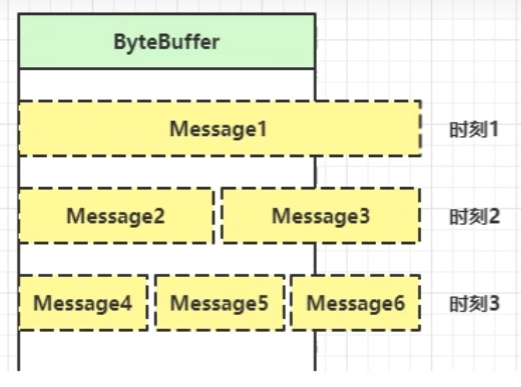
- 固定消息长度,数据报大小一样,服务器按预定长度读取,缺点是浪费带宽
- 按分隔符拆分,缺点是效率低
- TLV格式,即Type类型、Length长度、Value数据,类型和长度已知的情况下,就可以方便获取消息大小,分配合适的buffer,缺点是buffer需要提前分配,如果内容过大,则影响server吞吐量
- Http 1.1 是TLV格式
- Http 2.0 是LTV格式
扩容
在处理读事件的基础上,如果当前的Buffer大小不能存储完整的一条数据,就进行扩容Buffer。
public static void main(String[] args) throws IOException {
    ServerSocketChannel ssc = ServerSocketChannel.open();
    ssc.bind(new InetSocketAddress(8080));
    ssc.configureBlocking(false);

    // 1. 注册channel
    Selector selector = Selector.open();
    SelectionKey sscKey = ssc.register(selector, 0, null);
    sscKey.interestOps(SelectionKey.OP_ACCEPT);

    List<ServerSocketChannel> channels = new ArrayList<>();
    while(true) {
        // 2. select 方法
        selector.select();

        // 3. 处理事件
        Iterator<SelectionKey> iter = selector.selectedKeys().iterator();
        while(iter.hasNext()) {
            SelectionKey key = iter.next();
            iter.remove();

            if(key.isAcceptable()) {
                // 处理accept事件
                ServerSocketChannel channel = (ServerSocketChannel) key.channel();
                log.debug("key: {}", key);
                SocketChannel sc = channel.accept();
                sc.configureBlocking(false);

                ByteBuffer buffer = ByteBuffer.allocate(8);
                SelectionKey scKey = sc.register(selector, 0, buffer);
                scKey.interestOps(SelectionKey.OP_READ);
                log.debug("sc: {}", sc);
            } else if(key.isReadable()) {
                // 处理read事件
                try {
                    SocketChannel channel = (SocketChannel) key.channel();
                    ByteBuffer buffer = (ByteBuffer) key.attachment();
                    int len = channel.read(buffer);
                    System.out.println(len);

                    if(len == -1) {
                        key.cancel();
                        System.out.println("主动断开连接");
                    } else {
                        split(buffer);
                        if(buffer.position() == buffer.limit()) {
                            ByteBuffer newBuffer = ByteBuffer.allocate(buffer.capacity() * 2);
                            buffer.flip();
                            newBuffer.put(buffer);
                            key.attach(newBuffer);
                        }
                    }
                } catch (SocketException e) {
                    e.printStackTrace();
                    key.cancel();
                    System.out.println("强制断开连接");
                }
            }
        }
    }
}
private static void split(ByteBuffer source) {
    source.flip();
    for (int i = 0; i < source.limit(); i++) {
        // 找到一条完整消息
        if (source.get(i) == '\n') {
            int length = i + 1 - source.position();
            // 把这条完整消息存入新的 ByteBuffer
            ByteBuffer target = ByteBuffer.allocate(length);
            // 从 source 读,向 target 写
            for (int j = 0; j < length; j++) {
                target.put(source.get());
            }
            debugAll(target);
        }
    }
    source.compact(); // 0123456789abcdef  position 16 limit 16
}
NIO vs BIO
- Stream vs Channel
- stream仅支持阻塞API,channel同时支持阻塞、非阻塞API,网络你channel可配合selector实现多路复用
- 二者均为全双工,即读写可以同时进行
- stream不会自动缓冲数据,channel会利用系统提供的发送缓冲区、接收缓冲区。
IO 模型
IO模型的基础认识
阻塞调用与非阻塞调用
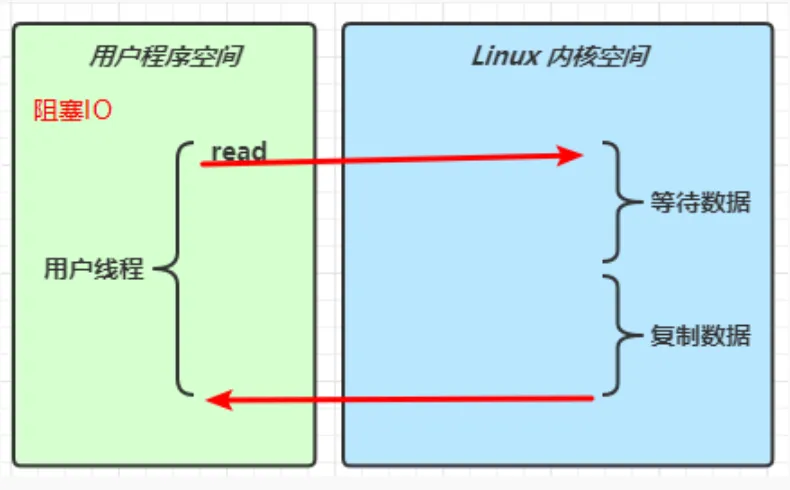
- 阻塞调用是指调用结果返回之前,当前线程会被挂起,调用线程只有在得到结果之后才会返回。
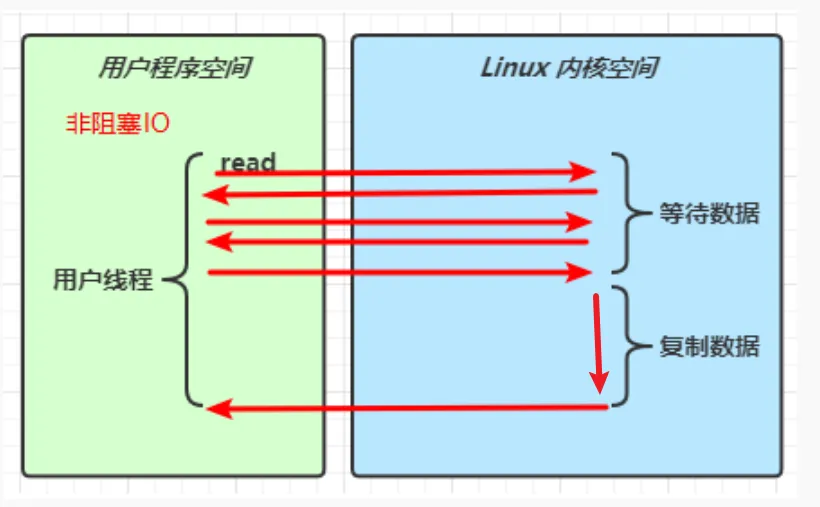
- 非阻塞调用指在不能立刻得到结果之前,该调用不会阻塞当前线程
- 两者最大的区别在于被调用放在收到请求到返回结果之前的这段时间内,调用方是否一直等待
- 阻塞:调用方一直在等待而且别的事情不能做
- 非阻塞:调用方先去忙别的事情
同步调用与异步调用
- 同步调用是指被
调用方得到最终结果之后才返回给调用方 - 异步调用是指被
调用方先返回应答,然后在计算调用结果,计算完成最终结果后在通知并返回给调用方
- 同步调用是指被
阻塞、非阻塞和同步、异步的区别
- 阻塞、非阻塞讨论的对象是
调用方 - 同步、异步讨论的对象是
被调用方
- 阻塞、非阻塞讨论的对象是
同步阻塞、同步非阻塞、同步多路复用、异步IO
- 同步:线程自己获取结果(一个线程)
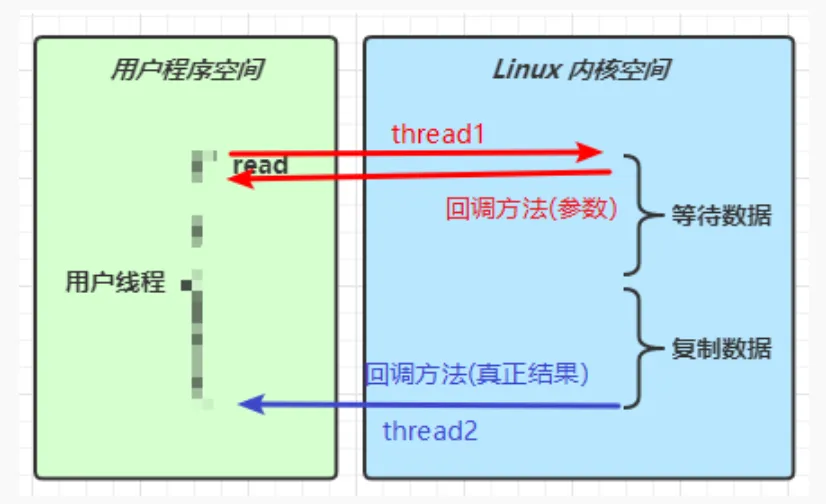
- 异步:线程自己不去获取结果,而是由其他线程送结果(至少两个线程)
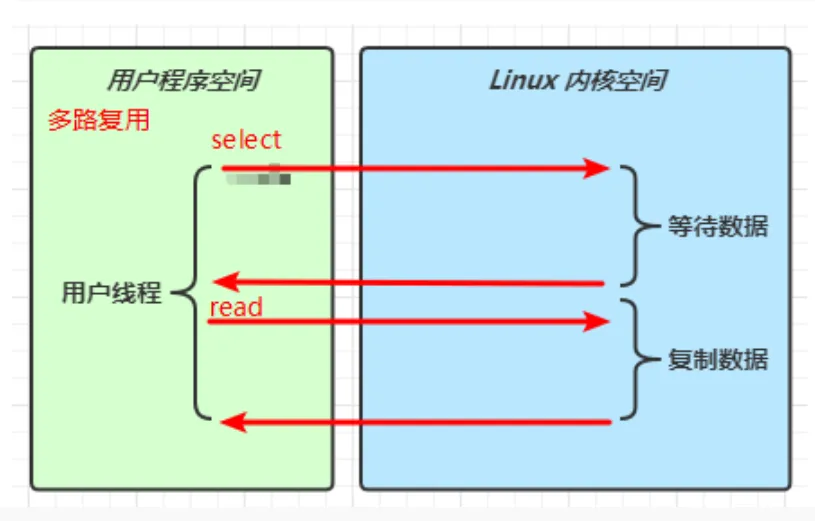
一个输入操作通常包括两个不同的阶段:
- 等待数据准备阶段
- 从内核想进程复制数据阶段
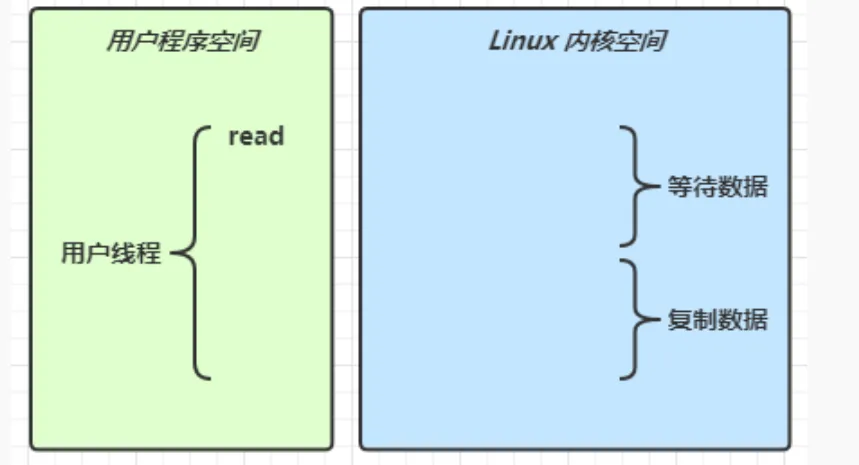
| 阻塞IO | 非阻塞IO |
|---|---|
 |  |
| 多路复用 | 异步IO |
 |  |
IO模型-阻塞IO(BIO)
阻塞IO
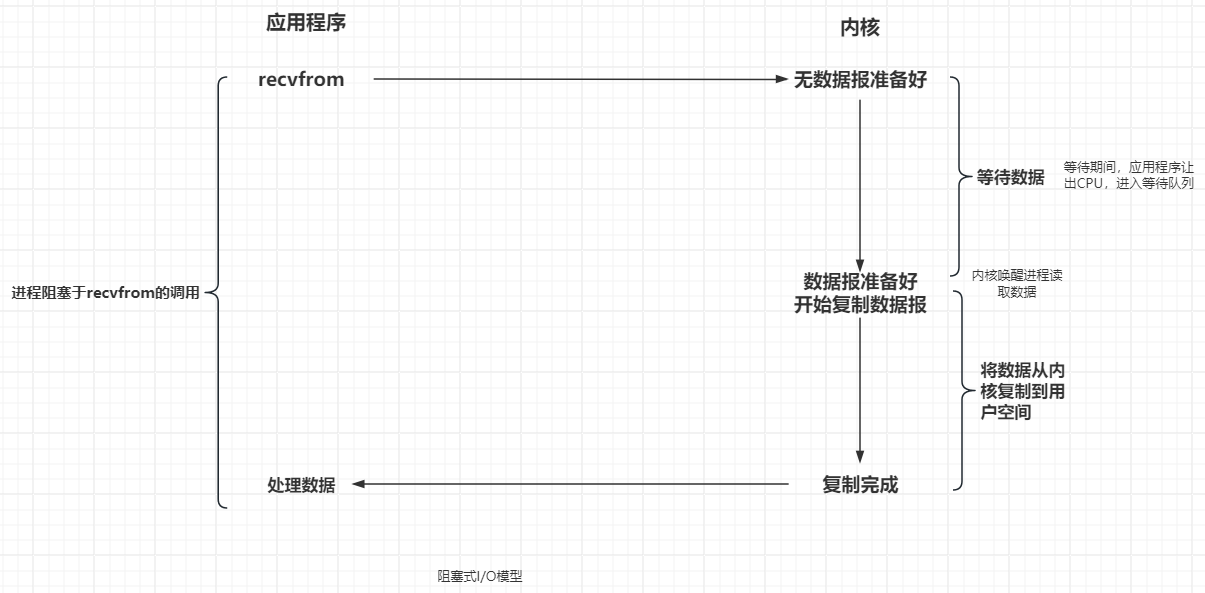
在阻塞IO模型中,应用程序在从调用recvfrom开始到它返回有数据报准备好这段时间是阻塞的,recvfrom返回成功后,应用程序开始处理数据报。 一个人在钓🐟,当没有🐟上钩时,就坐在岸边一直等待
- 优点:程序简单,在阻塞等待数据期间进程/线程挂起,基本不会占用CPU资源
- 缺点:每个连接需要独立的进程/线程单独处理,当并发请求量大时为了维护程序,内存、线程切换的开销较大,这种模型在实际生产中很少使用。
IO模型-非阻塞IO(NIO)
非阻塞IO
在非阻塞IO模型中,应用程序把一个套接字设置为非阻塞的,告诉内核当所请求的IO操作无法完成时,不要将进程睡眠,而是返回一个错误状态,应用成基于IO操作函数不断的轮询数据是否已经准备好,如果没有准备好,继续轮询,直到数据准备好为止。 一边钓🐟一边玩儿手机,隔会儿看看有没有🐟上钩时,有的话迅速拉杆
- 优点:不会阻塞在内核的等待数据过程,每次发起的IO请求都可以立即返回,不用阻塞等待,实时性较好。
- 缺点:轮询将会不断的询问内核,将占用大量的CPU时间,系统资源利用率较低,一般web服务器都不使用这种IO模型。

IO模型-IO多路复用(NIO)
IO多路复用
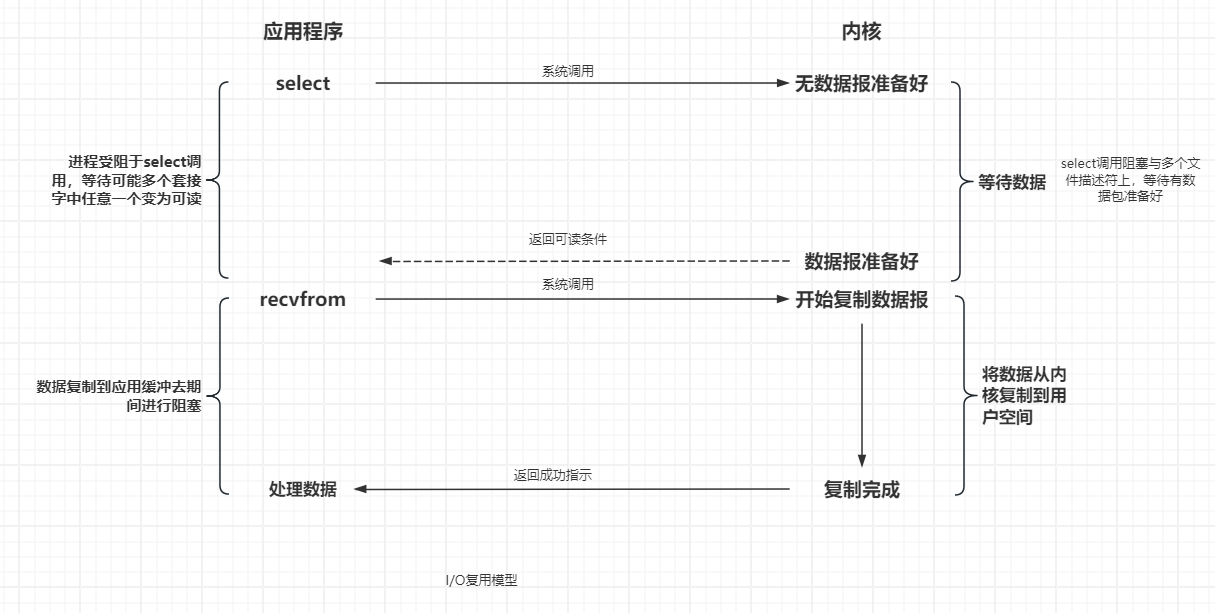
在IO多路复用模型中,会用到select、poll、epoll(Linux2.6以后支持)等系统调用,这些函数也会使进程阻塞,但是和阻塞IO不同,这两个函数可以同时阻塞多个IO操作,而且可以同时对多个读操作和写操作的IO进程检测,直到有数据可读、可写时,才真正调用IO函数。 放了一堆鱼竿,在岸上守着这一对鱼竿,没🐟的时候就玩手机
- 优点:可以基于一个阻塞对象,同时在多个描述符上等待就绪,而不是使用多个线程(每个文件描述符一个线程),这样可以大大节省系统资源。
- 缺点:当连接数较少时效率相比多线程+阻塞IO模型效率低。可能延迟更大,因为单个连接处理需要2次系统调用,占用时间会更长。
IO多路复用-select
select
select是Linux中最早的IO复用实现方案:
// 定义类型别名 __fd_mask,本质是 long int
typedef long int __fd_mask;
typedef struct {
  // fds_bits 是一个long类型数组,长度为1024/32 = 32
  // 共1024个bit位,每个bit位代表一个fd(文件描述符),0代表未就绪 1代表就绪
  __fd_mask fds_bits[__FD_SETSIZE / __NFDBITS];
} fd_set;

// select函数,用于监听多个fd的集合
int select(
  int nfds, // 要监听的fd_set的最大值fd + 1
  fd_set *readfds, // 要监听读事件的fd集合
  fd_set *writefds, // 要监听写事件的fd集合
  fd_set *exceptfds, // 要监听异常事件的fd集合
  struct timeval *timeout // 超时事件,null-永不超时,0-立即返回,>0-固定等待事件
);
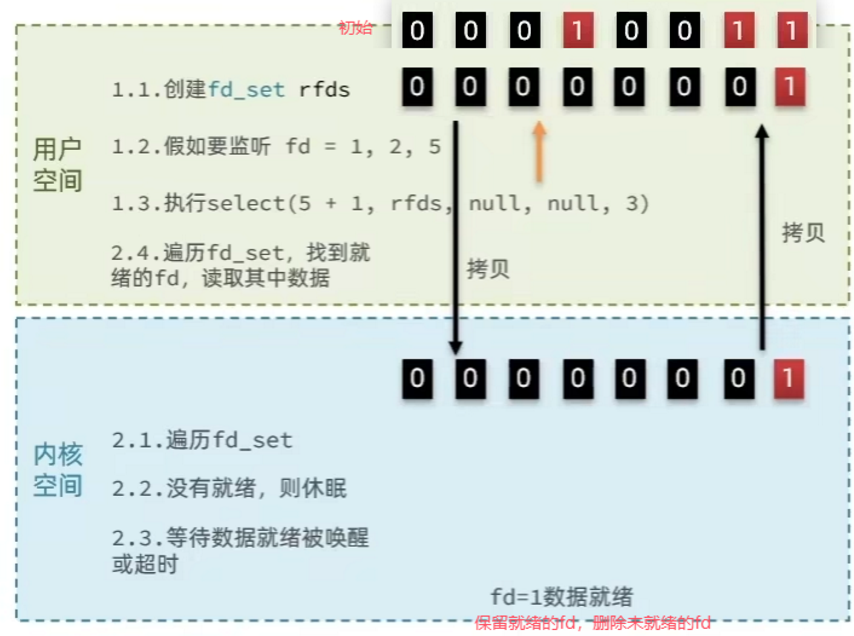  * select模式存在的问题: * 需要将整个fd_set从用户空间拷贝到内核空间,select结束还要再次拷贝回用户空间 * select无法得知具体是哪一个fd就绪,只能通过遍历fd_set * fd_set监听的fd数量有限,不能超过1024
 * select模式存在的问题: * 需要将整个fd_set从用户空间拷贝到内核空间,select结束还要再次拷贝回用户空间 * select无法得知具体是哪一个fd就绪,只能通过遍历fd_set * fd_set监听的fd数量有限,不能超过1024 IO多路复用-poll
poll
poll模式是对select模式做了简单改进,但性能提升不明显 IO流程:
- 创建pollfd数组,向其中添加关注的fd信息,数组大小自定义
- 调用poll函数,将pollfd数组拷贝到内核空间,转链表存储,无上限
- 内核遍历fd,判断是否就绪
- 数据就绪或超时后,拷贝pollfd数组到用户空间,返回就绪fd数量n
- 用户进程判断n是否大于0
- 大于0则遍历pollfd数组,找到就绪的fd
// pollfd 中的事件类型
#define POLLIN  // 读事件就绪
#define POLLOUT  // 写事件就绪
#define POLLERR  // 错误事件
#define POLLNVAL  // fd未打开

struct pollfd {
  int fd; // 文件描述符
  short int events; // 监听的事件类型:读、写、异常
  short int revents;  // 实际发生的事件类型
}

int poll(
  struct pollfd *fds, // pollfd数组,可以自定义大小
  nfds_t nfds,  // pollfd数组大小
  int timeout // 超时时间,-1-无限等待,0-立即返回,>0-固定等待事件
);
- 与select对比:
- select模式中的fd_set监听的fd数量有限,不能超过1024,而poll模式在内核采用链表,理论上无限大
- 监听fd越多,每次遍历消耗事件越长,性能反而降低
IO多路复用-epoll
epoll
epoll模式是对poll模式做了进一步改进,性能提升明显,但需要内核支持,它提供了三个函数:
struct eventpoll {
  struct rb_root rbr; // 红黑树,记录要监听的fd
  struct list_head rdlist; // 一个链表,记录就绪的fd
}
// 1.会在内核创建eventpoll结构体,返回对应的句柄epfd
int epoll_create(int size);

// 2.将一个fd添加到epoll的红黑树中,并设置ep_poll_callback
// callback触发时,就把对应的fd加入到rdlist这个就绪列表中
int epoll_ctl(
  int epfd, // epoll句柄
  int op, // 操作类型:ADD、DEL、MOD
  int fd, // 要监听的fd
  struct epoll_event *event // 要监听的事件类型: 读、写、异常
)

// 3.检查rdlist列表是否为空,不为空则返回就绪的fd的数量
int epoll_wait(
  int epfd, // epoll句柄
  struct epoll_event *events, // epoll_wait返回就绪的fd
  int maxevents, // events数组大小
  int timeout // 超时时间,-1-无限等待,0-立即返回,>0-固定等待事件
)
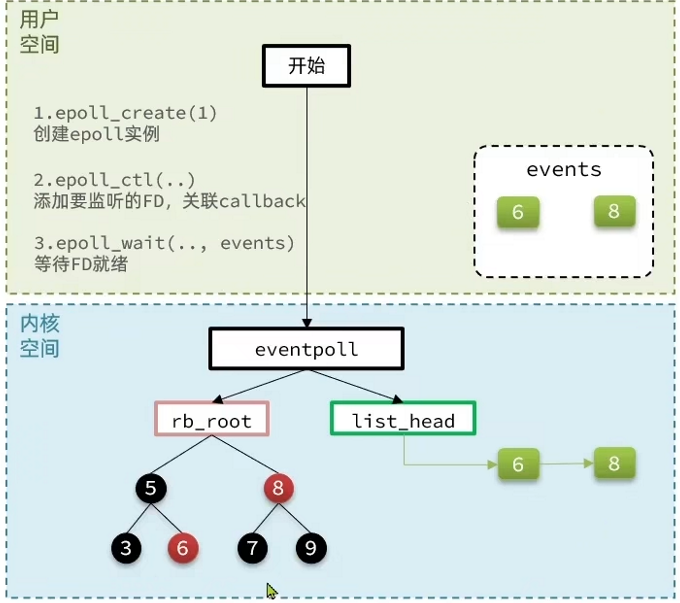
三种模式的对比
select模式存在的三个问题:
- 能监听的fd数量有限,不能超过1024
- 每次select都需要把所有监听的fd拷贝到内核空间,再拷贝回用户空间
- 每次都要遍历所有fd来判断就绪状态
poll模式的问题:
- poll利用链表解决了select中监听fd上限的问题,但依然要遍历所有fd,如果监听过多,性能会下降
epoll模式的解决方案:
- 基于epoll实例中的红黑树保存要监听的fd,理论上无上限,而且增删改查效率都非常高,性能不会随监听的fd数量增加而下降
- 每个fd只需要执行一次epoll_ctl添加到红黑树,以后每次epoll_wait无需传递任何参数,无需重复拷贝fd到内核空间
- 内核会将就绪的fd直接拷贝到用户空间指定位置,用户进程无需遍历所有fd就能知道就绪的fd。
IO模型-信号驱动式IO模型
信号驱动
在信号驱动的IO模型中,应用程序使用套接字进行信号驱动IO,并安装一个信号处理函数,进程继续运行并不阻塞,当数据准备好时,进程回收到一个SIGIO信号,可以在信号处理函数中调用IO操作函数处理数据。 🐟杆上系了一个铃铛,当铃铛响,就知道🐟上钩了,然后可以专心玩手机
- 优点:信号并没有在等待数据时阻塞,可以提高资源的利用率
- 缺点:信号IO在大量IO操作时可能会因为信号队列溢出导致没法通知信号驱动IO,尽管对于处理UDP套接字来说有用,即这种信号通知意味着到达一个数据报,挥着返回一个异步错误,但是对于TCP而言,信号驱动IO方式几乎无用,因为导致这种通知的条件为数众多,每一个来判断会消耗很大的资源
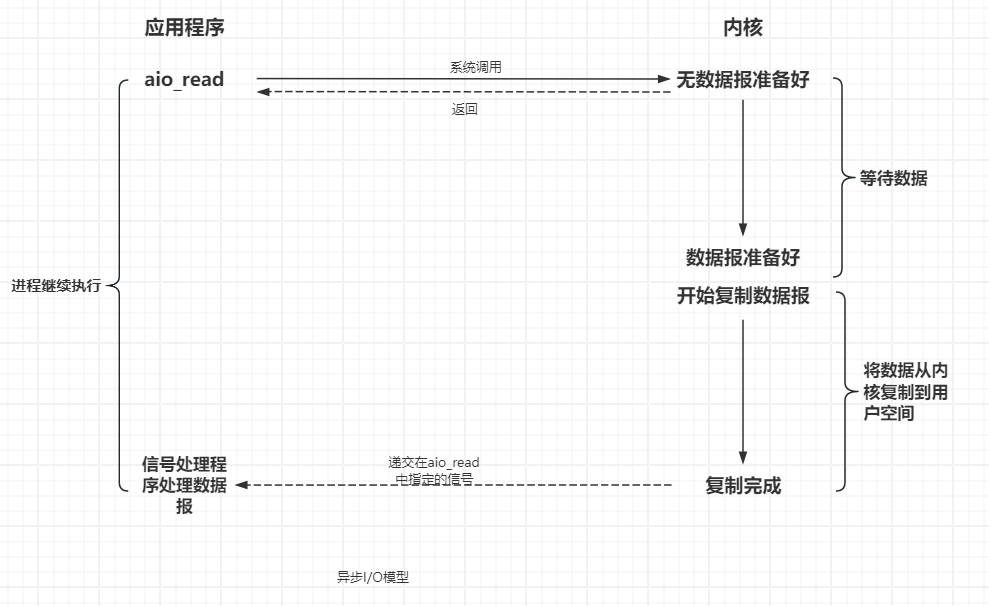
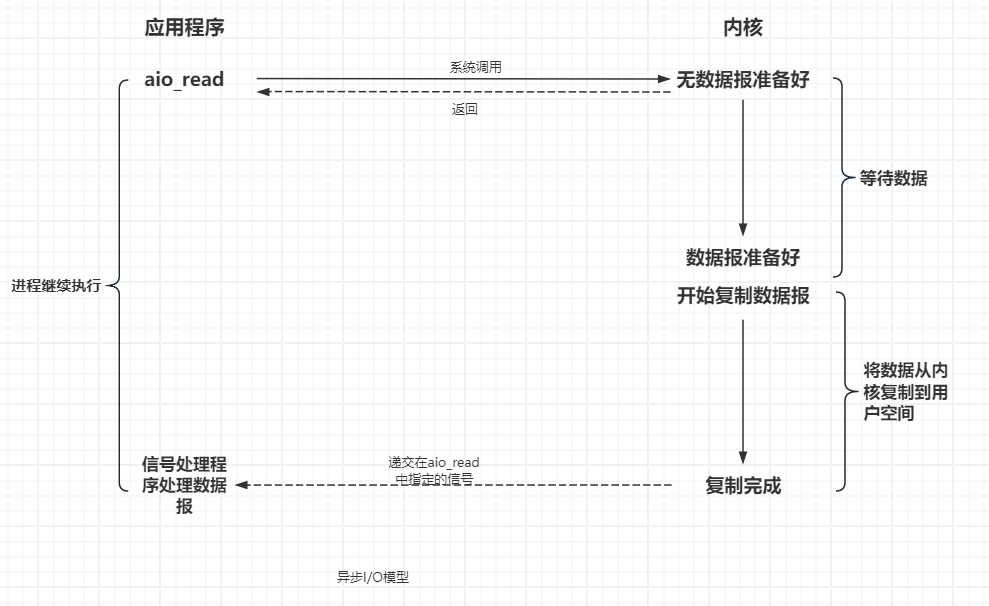
IO模型-异步IO(AIO)
异步IO
由PSOIX规范定义,应用程序告知内核启动某个操作,并让内核在整个操作(包括将数据从内核拷贝到应用程序的缓冲区)完成后通知应用程序。 这种模型与信号驱动模型的区别在于:
- 信号驱动IO是由内核通知应用程序合适启动IO操作
- 异步IO是由内核通知应用程序IO操作何时完成。
- 优点:异步IO能够充分利用DMA特性,让IO操作与计算重叠。
- 缺点:要实现真正的异步IO,操作系统需要大量的工作,目前window下通过IOCP实现。
5种IO模型总结
总结
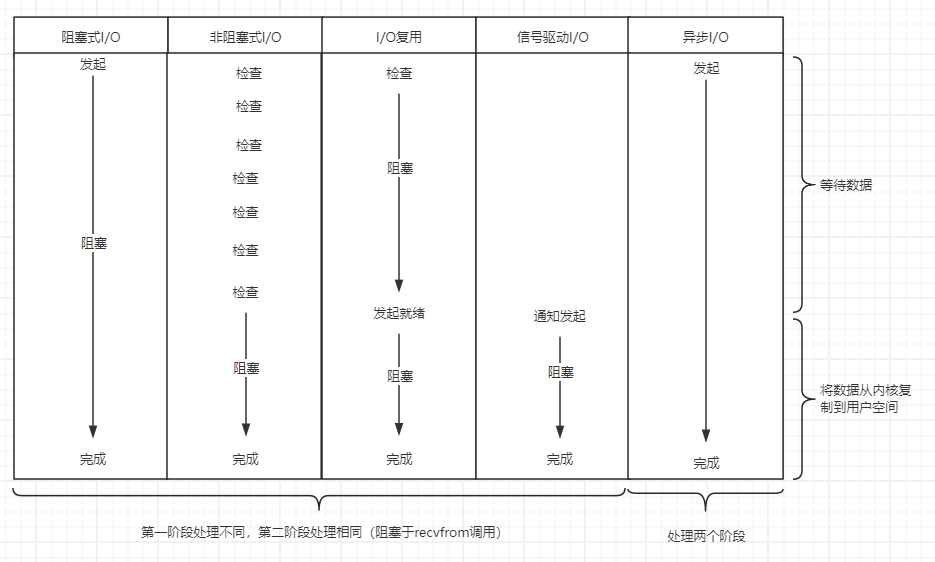 从图上可以看出。越往后,阻塞越少,理论上效率也是最优
 零拷贝
- 传统IO问题:传统的IO将一个文件通过socket写出
File f = new File("helloword/data.txt");
RandomAccessFile file = new RandomAccessFile(file, "r");

byte[] buf = new byte[(int)f.length()];
file.read(buf);

Socket socket = ...;
socket.getOutputStream().write(buf);
内部工作流程是这样:
用户态与内核态的切换发生了 3 次,这个操作比较重量级。数据拷贝了共 4 次

- java本身并不具备IO读写能力,因此read方法调用后,要从java程序的用户态切换至内核态,去调用操作系统(kernel)的读能力,将数据读入内核缓冲区,这期间用户线程阻塞,操作系统使用DMA(Direct Memory Access)来实现文件读,期间也不会使用CPU
DMA 也可以理解为硬件单元,用来解放 cpu 完成文件 IO
- 线程从内核态切换回用户态,将数据从内核缓冲区读入用户缓冲区(即byte[] buf),这期间CPU会参与拷贝,无法利用DMA。
- 调用write方法,这时将数据从用户缓冲区(byte[] buf)写入socket缓冲区,CPU会参与拷贝
- 接下来要向网卡写数据,这项能力 java 又不具备,因此又得从用户态切换至内核态,调用操作系统的写能力,使用 DMA 将 socket 缓冲区的数据写入网卡,不会使用 cpu
磁盘和内核缓冲区交互采用DMA,内核态和用户态交互采用CPU
NIO优化
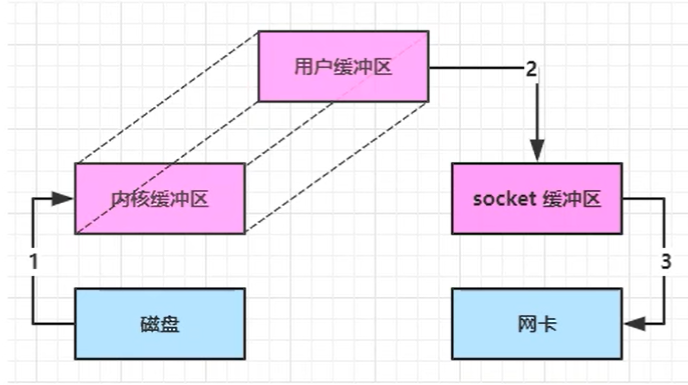
通过DirectByteBuf,将堆外内存映射带JVM内存中来直接访问使用,减少了一次数据拷贝,用户态与内核态的切换次数没有减少
- ByteBuffer.allocate(10) - 堆内存 HeapByteBuffer,使用Java内存
- ByteBuffer.allocateDirect(10) - 堆外内存 DirectByteBuffer,使用操作系统内存
- Java可以使用DirectByteBuf将堆外内存映射到JVM内存中来直接访问使用:
- 这块内存不受JVM垃圾回收的影响,因此内存地址固定,有助于IO读写
- Java中的DirectByteBuf对象仅维护了此内存的虚拟引用,内存回收分成两步
- DirectByteBuf对象被垃圾回收,将虚拟引用加入引用队列
- 通过专门线程访问引用队列,根据虚引用释放堆外内存
进一步优化(Linux2.1提供的sendFile)
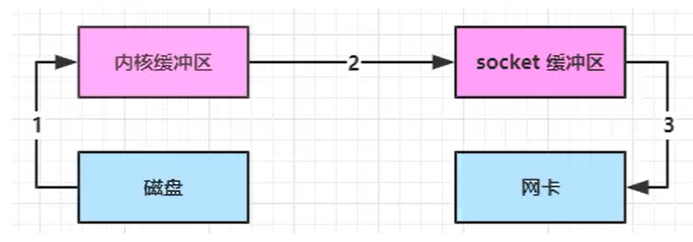
Java中对应着两个channel调用transferTo/transferFrom方法拷贝数据。只发生了一次用户态与内核态的切换,数据拷贝了3次
- Java调用transferTo方法,要从Java程序的用户态切换至内核态,使用DMA将数据读入内核缓冲区,不会使用CPU
- 数据从内核缓冲区传输到socket缓冲区,COU会参与拷贝
- 最后使用DMA将socket缓冲区的数据写入网卡,不会使用cpu
进一步优化(Linux2.4)
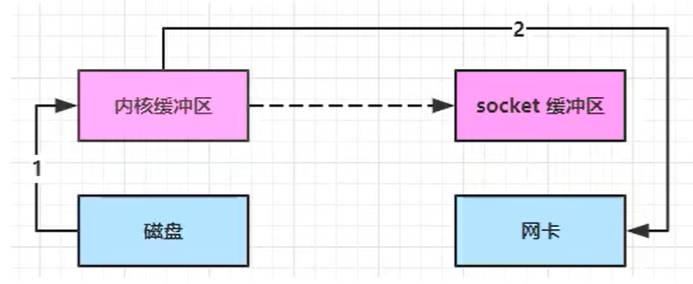
整个过程只发生了一次用户态与内核态的切换,数据拷贝了2次,所谓的零拷贝,并不是真正的无拷贝,而是在不会拷贝重复数据到JVM内存中
- 更少的用户态与内核态切换次数
- 不利用CPU计算,减少CPU缓存伪共享
- 零拷贝适合小文件传输
- Java调用transferTo方法,要从Java程序的用户态切换至内核态,使用DMA将数据读入内核缓冲区,不会使用CPU
- 只会将一些offset和length信息拷入socket缓冲区,几乎无消耗
- 使用DMA将socket缓冲区的数据写入网卡,不会使用cpu
Netty
- Cassandra - nosql数据库
- Spark - 大数据分布式计算框架
- Hadoop - 大数据分布式存储框架
- RocketMQ - 消息队列
- ElasticSearch - 搜索引擎
- gRPC - rpc框架
- Dubbo - rpc框架
- Spring 5.x - flux api完全抛弃了tomcat,替换为netty
- Zookeeper - 分布式协调服务
Netty的优势
- Netty & NIO
- 需要自己构建协议
- 解决TCP传输问腿,粘包、半包问题
- epoll空论徐导致CPU 100%
- 对API 进行增强,简化开发
Netty概述
概述
Netty是一个高性能的Java网络应用程序框架,可以帮助开发人员快速和容易地创建高性能、可靠的网络应用程序。Netty可以帮助开发人员构建强大的网络服务器和客户端应用程序,以便更容易地交换数据。Netty提供了一系列的功能,例如:支持多种协议,提供强大的编解码器,支持异步和同步请求处理以及一系列的可靠性机制。
- 添加依赖
<dependency>
  <groupId>io.netty</groupId>
  <artifactId>netty-all</artifactId>
  <version>4.1.39.Final</version>
</dependency>
- 服务器端
ServerBootstrap创建服务器启动类.group(new NioEventLoopGroup())创建处理器组,可以理解成线程池+Selector.channel(NioServerSocketChannel.class)基于NIO的实现.childHandler每个Channel的处理方式ChannelInitializer具体的处理器pipeline业务工作流
public class HelloServer {
    public static void main(String[] args) throws InterruptedException {
        // 1.启动器,负责组装Netty组件,启动服务器
        new ServerBootstrap()
                // 2. boss和worker
                .group(new NioEventLoopGroup())
                // 3. 选择ServerSocketChannel实现类,NioServerSocketChannel代表nio模型
                .channel(NioServerSocketChannel.class) // NIO BIO
                // 4. boss负责处理连接 worker(child)负责处理读写
                .childHandler(
                     // 5. channel代表和客户端进行数据读写的通道,Initializer初始化,负责添加别的handler
                    new ChannelInitializer<NioSocketChannel>() {
                    // 12. 在连接建立后被调用
                    @Override
                    protected void initChannel(NioSocketChannel channel) throws Exception {
                        // 6. 添加具体的 handler
                        channel.pipeline().addLast(new StringDecoder());
                        channel.pipeline().addLast(new ChannelInboundHandlerAdapter() {
                            @Override
                            public void channelRead(ChannelHandlerContext ctx, Object msg) throws Exception {
                                System.out.println(msg);
                            }
                        });
                    }
                })
                // 7. 绑定一个端口,并启动
                .bind(8080);
    }
}
- 客户端
ServerBootstrap创建客户端启动类.group(new NioEventLoopGroup())创建处理器组,可以理解成线程池+Selector.channel(NioServerSocketChannel.class)基于NIO的实现.handler创建具体的业务处理器connect进行连接sync等待连接建立完毕
public class HelloClient {

    public static void main(String[] args) throws InterruptedException {
        // 7. 启动类
        new Bootstrap()
                // 8. 添加 EventLoopGroup
                .group(new NioEventLoopGroup())
                // 9. 选择客户端的 (channel的实现)NIO 处理器
                .channel(NioSocketChannel.class)
                // 10. 添加处理器
                .handler(new ChannelInitializer<NioSocketChannel>() {
                    // 12. 在连接建立后被调用
                    @Override
                    protected void initChannel(NioSocketChannel nioSocketChannel) throws Exception {
                        nioSocketChannel.pipeline().addLast(new StringEncoder());
                    }
                })
                // 11. 连接到服务器
                .connect(new InetSocketAddress("127.0.0.1",8080))
                // 13. 阻塞方法,直到 连接建立
                .sync()
                // 代表连接对象
                .channel()
                // 14. 向服务器发送数据
                .writeAndFlush("hello word!");
    }
}
- 流程
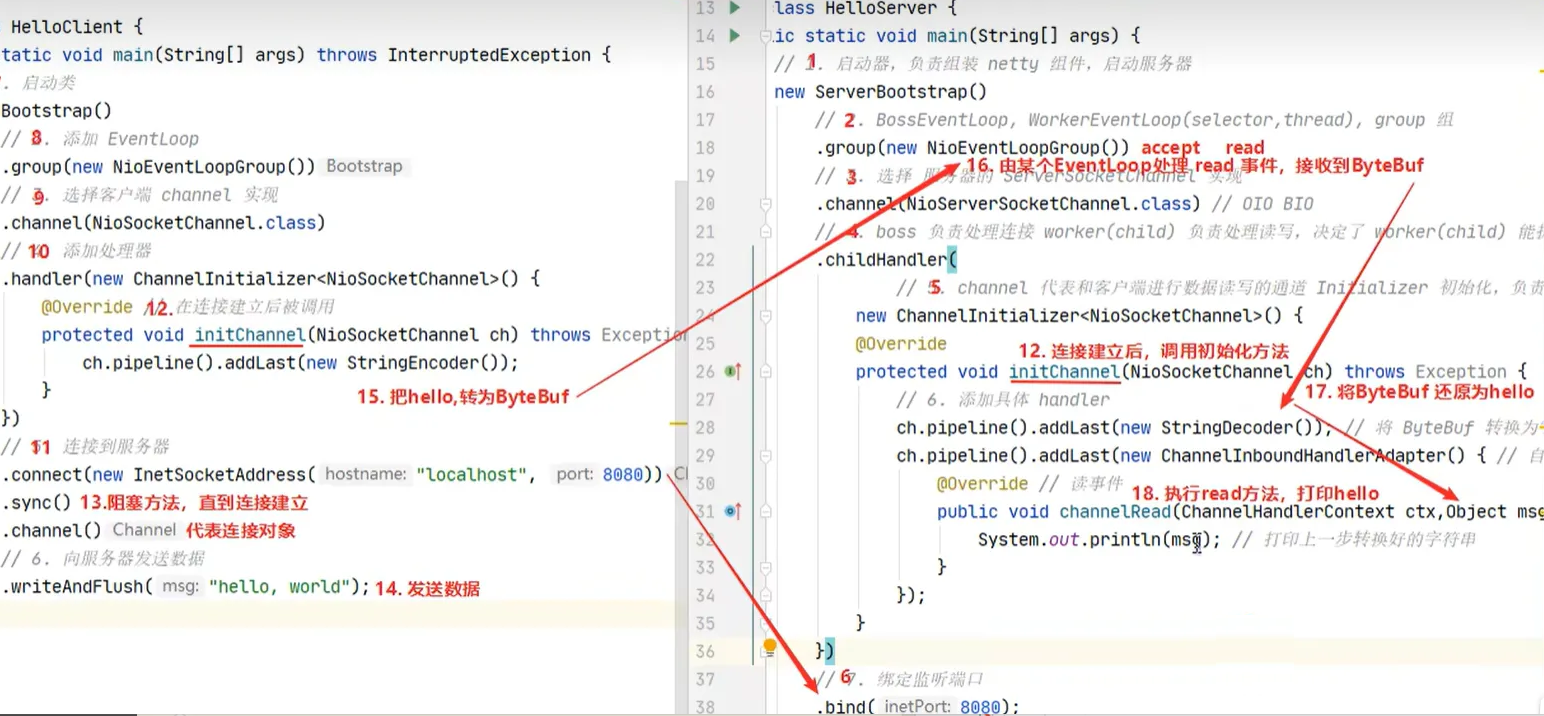
- 把
channel理解为数据的通道 - 把msg理解为流动的数据,最开始输入的是
ByteBuf,但经过pipeline的加工,会编程其他类型对象,最后输入又变成ByteBuf - 把
handle理解为数据的处理工序- 工序有多道,合在一起就是
pipeline,pipeline负责发布事件(读、读完成..)传播给每个handler,handler对自己感兴趣的事件进行处理(重写了相应事件处理方法) handler分为Inbound和Outbound两类
- 工序有多道,合在一起就是
- 把
eventLoop理解为处理数据的工人- 工人可以管理多个
channel的io操作,并且一旦工人负责了某个channel,就要负责到底(绑定) - 工人既可以执行IO操作,也可以进行任务处理,每位工人有任务队列,队列里可以堆放多个
channel的待处理任务,任务分为普通任务、定时任务 - 工人按照
pipeline顺序,依次按照handle的规划处理数据,可以为每道工序指定不同的工人
- 工人可以管理多个
Netty组件
EventLoop
EventLoop
- EventLoop(事件循环对象)本质是一个
单线程执行器(同时维护了一个Selector),里面有run方法处理Channel上源源不断的IO事件 - EventLoopGroup(事件循环组)是一组EventLoop,Channel一般会调用
EventLoopGroup的register方法来绑定其中一个EventLoop,后续这个Channel上的IO事件都会被这个EventLoop处理(保证IO事件处理时的线程安全)
- 演示EventLoopGroup和使用EventLoop提交任务
@Slf4j
public class EventLoopGroupDemo {
    public static void main(String[] args) {
        // 内部创建了两个EventLoop,每个EventLoop维护一个线程
        NioEventLoopGroup group = new NioEventLoopGroup(2);
        System.out.println(group.next());
        System.out.println(group.next());
        System.out.println(group.next());
        // 一个EventLoop进行普通任务
        group.next().submit(() -> {
            try {
                Thread.sleep(1000);
            } catch (InterruptedException e) {
                e.printStackTrace();
            }
            log.debug("ok");
        });
        log.debug("main ok");
    }
}

// 输出结果
io.netty.channel.nio.NioEventLoop@30ee2816
io.netty.channel.nio.NioEventLoop@31d7b7bf
io.netty.channel.nio.NioEventLoop@30ee2816
17:05:00.314 [main] DEBUG org.example.net.netty.EventLoopGroupDemo - main ok
17:05:01.329 [nioEventLoopGroup-2-1] DEBUG org.example.net.netty.EventLoopGroupDemo - ok
- EventLoop绑定机制
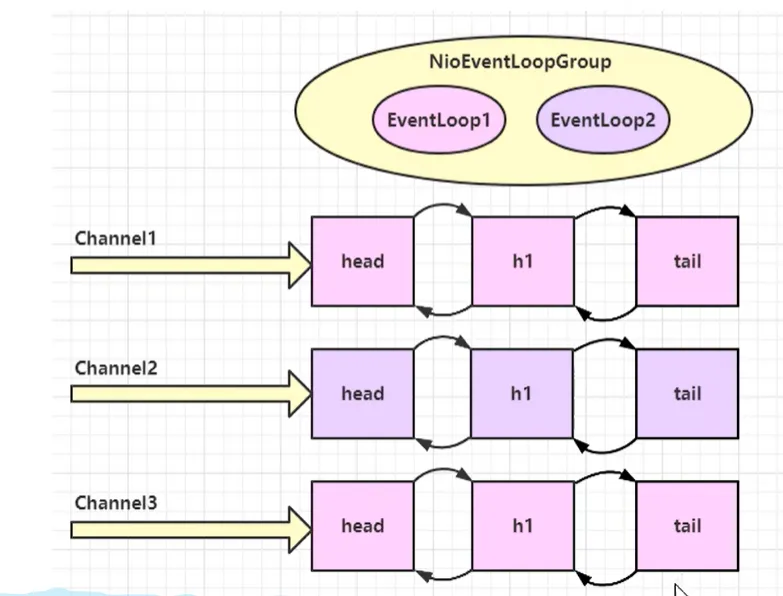
一旦工人负责了某个channel(一个Channel相当于一个连接),就要负责到底(绑定)